 yuzhiblue
最终效果
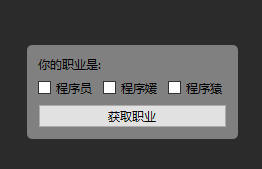
圆角窗口
实现圆角窗口要做以下两件事
设置窗口样式
# 透明背景
self.setAttribute(Qt.WA_TranslucentBackground)
# 无边框
self.setWindowFlag(Qt.WindowType.FramelessWindowHint)
# 通过 qss 设置背景和圆角
self.setStyleSheet("Window{background-color:gray;border-radius:5px;}")重载paintEvent
opt = QStyleOption()
opt.initFrom(self)
p = QPainter(self)
self.style().drawPrimitive(QStyle.PE_Widget, opt, p, self)
super().paintEvent(event)
重载的目的是为了让窗口使用设置的QSS去绘制背景。
实现鼠标拖动
def mousePressEvent(self, event: PySide6.QtGui.QMouseEvent) -> None:
 if event.button() == Qt.LeftButton:
 self.mouse_start_pt = event.globalPosition().toPoint()
 self.window_pos = self.frameGeometry().topLeft()
 self.drag = True
def mouseMoveEvent(self, event: PySide6.QtGui.QMouseEvent) -> None:
 if self.drag:
 distance = event.globalPosition().toPoint() - self.mouse_start_pt
 self.move(self.window_pos + distance)

def mouseReleaseEvent(self, event: PySide6.QtGui.QMouseEvent) -> None:
 if event.button() == Qt.LeftButton:
 self.drag = False
完整的代码
import PySide6
from PySide6.QtGui import QIntValidator, Qt, QPainter
from PySide6.QtWidgets import QApplication, QWidget, \
 QVBoxLayout, QHBoxLayout, QLabel, QButtonGroup, \
 QPushButton, QCheckBox, QLineEdit, QStyleOption, QStyle


class CheckBoxGroup(QButtonGroup):
 def checkedId(self) -> list[int]:
 lst = []
 for btn in self.buttons():
 if btn.isChecked():
 lst.append(self.id(btn))

 return lst


class Window(QWidget):
 def __init__(self):
 super().__init__()
 self.drag = None
 self.window_pos = None
 self.mouse_start_pt = None
 self.__set_up_ui()

 def paintEvent(self, event: PySide6.QtGui.QPaintEvent) -> None:
 opt = QStyleOption()
 opt.initFrom(self)
 p = QPainter(self)
 self.style().drawPrimitive(QStyle.PE_Widget, opt, p, self)
 super().paintEvent(event)

 def __set_up_ui(self):
 self.setAttribute(Qt.WA_TranslucentBackground)
 self.setWindowFlag(Qt.WindowType.FramelessWindowHint)
 self.setStyleSheet("Window {background-color:gray;border-radius:5px;}")

 v_box = QVBoxLayout(self)
 v_box.addWidget(QLabel("你的职业是:"))
 h_box = QHBoxLayout()
 v_box.addLayout(h_box)
 lst = [
 QCheckBox("程序员"),
 QCheckBox("程序媛"),
 QCheckBox("程序猿"),
 ]
 qbg = CheckBoxGroup(self)
 qbg.setExclusive(False)
 self.qgb = qbg
 _id = 1
 for qrb in lst:
 h_box.addWidget(qrb)
 qbg.addButton(qrb, _id)
 _id += 1

 btn = QPushButton("获取职业")
 btn.clicked.connect(lambda: print(self.qgb.checkedId()))
 v_box.addWidget(btn)

 le = QLineEdit()
 le.setValidator(QIntValidator())

 def mousePressEvent(self, event: PySide6.QtGui.QMouseEvent) -> None:
 if event.button() == Qt.LeftButton:
 self.mouse_start_pt = event.globalPosition().toPoint()
 self.window_pos = self.frameGeometry().topLeft()
 self.drag = True
 def mouseMoveEvent(self, event: PySide6.QtGui.QMouseEvent) -> None:
 if self.drag:
 distance = event.globalPosition().toPoint() - self.mouse_start_pt
 self.move(self.window_pos + distance)

 def mouseReleaseEvent(self, event: PySide6.QtGui.QMouseEvent) -> None:
 if event.button() == Qt.LeftButton:
 self.drag = False

app = QApplication([])
w = Window()
w.show()
app.exec()